下载
https://buildroot.org/
不要使用root账户
#修改root密码
passwd root
#创建一个新账户
useradd -m builder
#删除
userdel builder
#使用root账户给builder用户分配解压的buildroot文件夹权限
chown -R builder:builder /home/builder/buildroot
#后面再使用builder用户
su builder
配置Target options
make menuconfig
Target options
        -> Target Architecture = ARM (little endian)
        -> Target Binary Format = ELF
        -> Target Architecture Variant = cortex-A7
        -> Target ABI = EABIhf
        -> Floating point strategy = NEON/VFPv4
        -> ARM instruction set = ARM
配置Toolchain
Toolchain
   -> Toolchain type = External toolchain
   -> Toolchain = Custom toolchain //选择用户的交叉编译器
   -> Toolchain origin = Pre-installed toolchain
   -> Toolchain path =/root/gcc-linaro-6.5.0-2019.12-x86_64_arm-linux-gnueabihf //交叉编译器路径
   -> Toolchain prefix = arm-linux-gnueabihf //前缀
   -> External toolchain gcc version = 6.x
   -> External toolchain kernel headers series = 5.10.x
   -> External toolchain C library = glibc/eglibc
   -> [*] Toolchain has SSP support? (NEW) //选中
   -> [*] Toolchain has RPC support? (NEW) //选中
   -> [*] Toolchain has C++ support? //选中
   -> [*] Enable MMU support (NEW) //选中
配置System configuration
System configuration
   -> System hostname = Embedfire_imx6ull //平台名字
   -> System banner = Welcome to embedfire i.mx6ull //欢迎语
   -> Init system = BusyBox //使用 busybox
   -> /dev management = Dynamic using devtmpfs + mdev //使用 mdev
   -> [*] Enable root login with password (NEW) //使能登录密码
   -> Root password = root //登录密码为 root
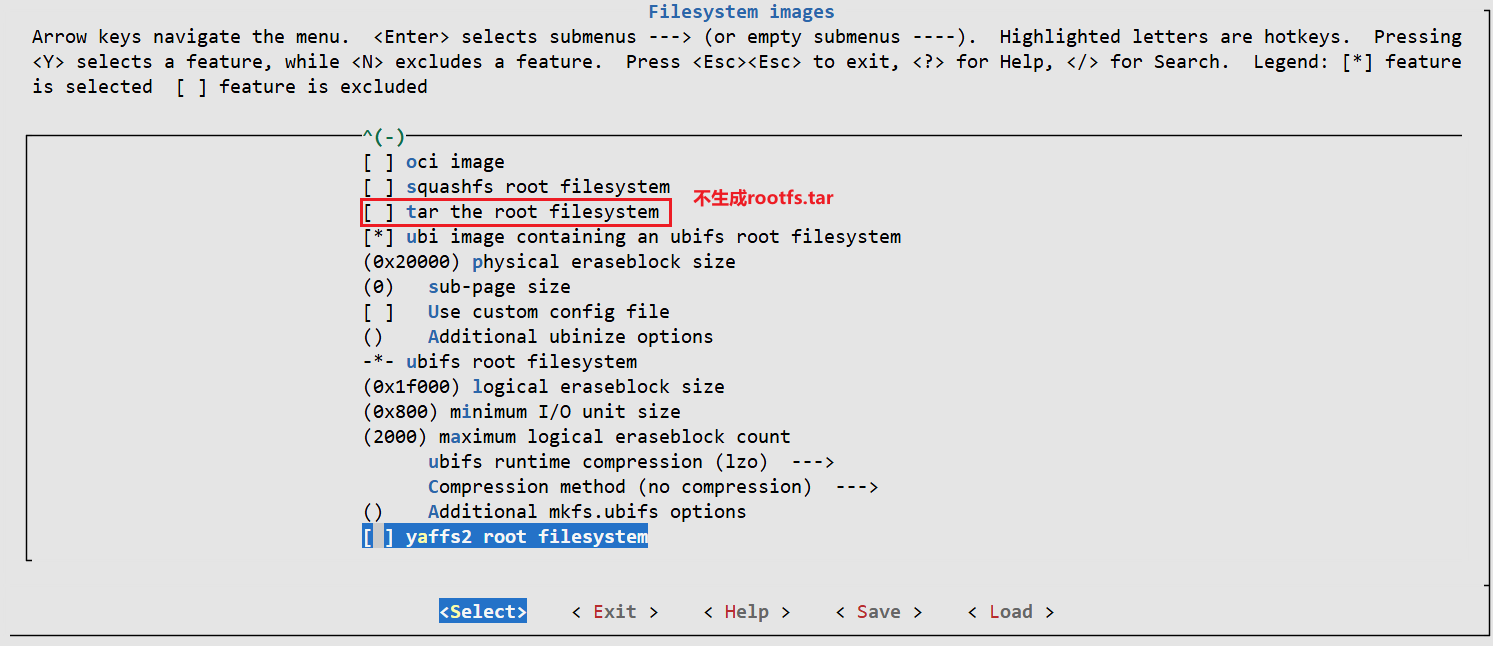
配置Filesystem images
-> Filesystem images
   -> [*] ext2/3/4 root filesystem //如果是 EMMC 或 SD 卡的话就用 ext3/ext4
      -> ext2/3/4 variant = ext4 //选择 ext4 格式
-> [*] ubi image containing an ubifs root filesystem //如果使用 NAND 的话就用 ubifs
nand配置
- nand信息

-
配置
[*] ubi image containing an ubifs root filesystem
    physical eraseblock size           = 0x20000
    sub-page size                      = 0

[*] ubifs root filesystem
    logical eraseblock size            = 0x1f000
    minimum I/O unit size              = 0x800
    maximum logical eraseblock count   = 2000
    ubifs runtime compression          = lzo
    Compression method                 = no compression
1.
[*] ubi image containing an ubifs root filesystem- 作用:告诉 Buildroot 生成一个 UBI 镜像(
ubi.img),其中包含一个 UBIFS 格式的根文件系统。 - 背景:UBI (Unsorted Block Images) 是 Linux 内核中为原始 NAND Flash 设计的磨损平衡、坏块管理层。UBI 镜像可以直接烧写到 NAND 分区上,内核通过 UBI 驱动挂载内部的 UBIFS。
子参数:
physical eraseblock size = 0x20000- 含义:NAND Flash 芯片的物理擦除块大小(Physical Erase Block Size),十六进制
0x20000= 128 KiB。 - 作用:告诉 UBI 镜像生成工具(
ubinize)你的 Flash 芯片每个擦除块实际有多大。这个值必须与硬件严格匹配,否则镜像无法正确烧写或挂载。
sub-page size = 0- 含义:NAND Flash 的子页大小(Sub-page Size)。值为
0表示不使用子页功能。 - 作用:某些 NAND 芯片支持比页更小的写入单元(子页),用于优化小数据写入。设为 0 表示禁用该特性,UBI 将按完整页操作。
2.
[*] ubifs root filesystem- 作用:启用 UBIFS 格式的根文件系统(而不是 ext4、squashfs 等)。UBIFS 是专为 UBI 层设计的日志型文件系统,适合 NAND Flash。
子参数:
logical eraseblock size = 0x1f000- 含义:逻辑擦除块大小(Logical Erase Block Size),十六进制
0x1f000= 126,976 字节(约 124 KiB)。 - 计算:LEB 大小 = PEB 大小 - UBI 头开销。UBI 在每个物理擦除块头部占用少量字节(通常 2 个页或 64 字节)。
这里 PEB = 128 KiB,LEB ≈ 128 KiB - 开销 = 124 KiB,吻合。这个值由
ubinize自动计算,一般无需手动改。
minimum I/O unit size = 0x800- 含义:最小 I/O 单元大小,即 NAND Flash 的页大小(Page Size)。
0x800= 2048 字节(2 KiB)。 - 作用:UBIFS 和 UBI 必须按页对齐写入。常见 NAND 页大小为 2KiB、4KiB 或 8KiB。此值必须匹配硬件。
maximum logical eraseblock count = 2000- 含义:UBIFS 文件系统中允许的最大逻辑擦除块数量。
- 作用:限制 UBIFS 占用的最大体积。实际文件系统大小 = LEB 大小 × 最大 LEB 数量。 这里:124 KiB × 2000 ≈ 242 MiB。如果你的 UBI 分区大于此值,UBIFS 只会使用前 2000 个 LEB;如果分区更小,则自动缩小。 建议:将此值设置为分区 LEB 总数的上限,或留一些余量(过大会浪费内存用于元数据)。
ubifs runtime compression = lzo- 含义:UBIFS 在运行时写入数据时使用的压缩算法,这里为 LZO。
- 作用:当应用程序向文件系统写入文件时,UBIFS 会尝试用 LZO 压缩数据后再存入 Flash。可节约空间,但牺牲少量 CPU 性能。可选
none、lzo、zlib等。
Compression method = no compression- 含义:Buildroot 生成 UBIFS 镜像时(即制作根文件系统镜像阶段)采用的压缩方法。这里为
no compression(不压缩)。 - 注意:这与“运行时压缩”是两个不同概念:
- 镜像生成压缩:制作
ubifs.img时是否压缩整个文件系统。如果选lzo,生成的镜像体积小,但挂载时需要解压(只读,如 squashfs 方式)。UBIFS 通常不启用此选项,因为它本身支持运行时压缩。 - 运行时压缩:文件系统运行时对写入文件实时压缩。
- 镜像生成压缩:制作
- 为什么选 no compression:防止 Buildroot 在生成镜像时对内容做额外压缩,因为运行时压缩已经足够,且双重压缩无意义。
- 作用:告诉 Buildroot 生成一个 UBI 镜像(
关闭kernel和uboot的编译(默认关闭)
-> Kernel
-> [ ] Linux Kernel //取消 Linux Kernel 选项!

-> Bootloaders
-> [ ] U-Boot //取消 U-Boot 选项!
执行编译
make -j32