下载
https://buildroot.org/
不要使用root账户
#修改root密码
passwd root
#创建一个新账户
useradd -m builder
#删除
userdel builder
#使用root账户给builder用户分配解压的buildroot文件夹权限
chown -R builder:builder /home/builder/buildroot
#后面再使用builder用户
su builder
修改分区规划
.env.txt文件
mtdparts=spi-nand0:4M(env),4M(idblock),512K(uboot),4M(boot),30M(oem),10M(userdata),-(rootfs)
sys_bootargs= ubi.mtd=6 root=ubi0:rootfs rootfstype=ubifs rk_dma_heap_cma=66M;
配置Target options
make menuconfig
Target options
        -> Target Architecture = ARM (little endian)
        -> Target Binary Format = ELF
        -> Target Architecture Variant = cortex-A7
        -> Target ABI = EABIhf
        -> Floating point strategy = NEON/VFPv4
        -> ARM instruction set = ARM
配置Toolchain
Toolchain
   -> Toolchain type = External toolchain
   -> Toolchain = Custom toolchain //选择用户的交叉编译器
   -> Toolchain origin = Pre-installed toolchain
   -> Toolchain path =/root/gcc-linaro-6.5.0-2019.12-x86_64_arm-linux-gnueabihf //交叉编译器路径
   -> Toolchain prefix = arm-linux-gnueabihf //前缀
   -> External toolchain gcc version = 6.x
   -> External toolchain kernel headers series = 5.10.x
   -> External toolchain C library = glibc/eglibc
   -> [*] Toolchain has SSP support? (NEW) //选中
   -> [*] Toolchain has RPC support? (NEW) //选中
   -> [*] Toolchain has C++ support? //选中
   -> [*] Enable MMU support (NEW) //选中
配置System configuration
System configuration
   -> System hostname = Embedfire_imx6ull //平台名字
   -> System banner = Welcome to embedfire i.mx6ull //欢迎语
   -> Init system = BusyBox //使用 busybox
   -> /dev management = Dynamic using devtmpfs + mdev //使用 mdev
   -> [*] Enable root login with password (NEW) //使能登录密码
   -> Root password = root //登录密码为 root
配置Filesystem images
-> Filesystem images
   -> [*] ext2/3/4 root filesystem //如果是 EMMC 或 SD 卡的话就用 ext3/ext4
      -> ext2/3/4 variant = ext4 //选择 ext4 格式
-> [*] ubi image containing an ubifs root filesystem //如果使用 NAND 的话就用 ubifs
- > [*] squashfs root filesystem
	-> block size (128k)
	-> compression algorithm (zstd)
nand配置
- nand信息
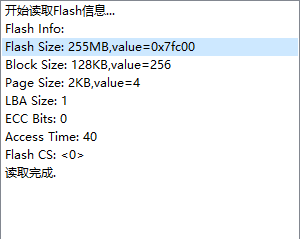
-
配置
[*] ubi image containing an ubifs root filesystem
    physical eraseblock size           = 0x20000
    sub-page size                      = 0

[*] ubifs root filesystem
    logical eraseblock size            = 0x1f000
    minimum I/O unit size              = 0x800
    maximum logical eraseblock count   = 2000
    ubifs runtime compression          = lzo
    Compression method                 = no compression
关闭kernel和uboot的编译(默认关闭)
-> Kernel
-> [ ] Linux Kernel //取消 Linux Kernel 选项!

-> Bootloaders
-> [ ] U-Boot //取消 U-Boot 选项!
执行编译
make -j32